The hesitation is completely reasonable. An app asks to connect your bank, you get bounced into your banking app, you approve something, and you come back not entirely sure what you just agreed to. This guide is what you just agreed to.
The one-sentence version
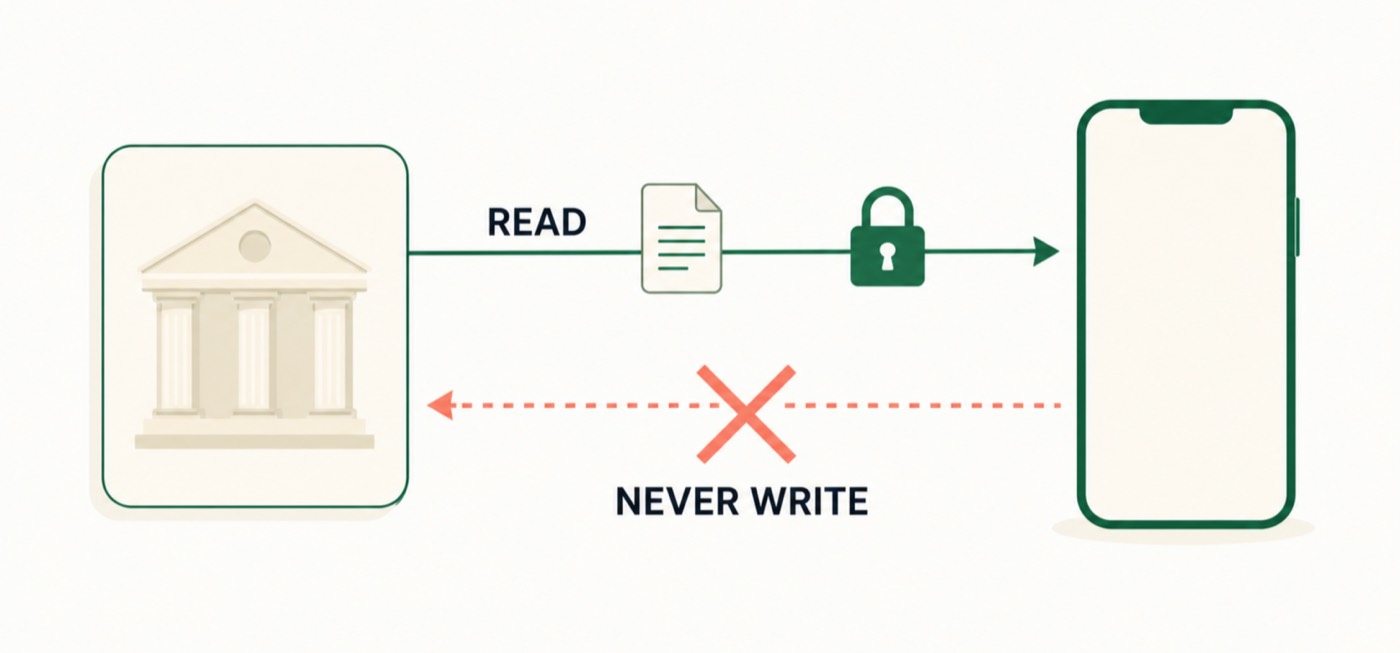
The app can read your balance and transactions. It cannot move money, it never sees your banking password, and you can cut it off from inside your own bank whenever you like.
Who is allowed to ask
In the EU this is governed by PSD2, the second Payment Services Directive. It created a licensed role called an AISP, an Account Information Service Provider. An AISP is a company authorised by a national financial regulator to request read-only access to your accounts, on your instruction.
The licence matters. It is not a terms-of-service promise; it is a supervised permission with capital requirements, audits and a regulator that can withdraw it. Most apps you meet, including Pocket Pivot, are not themselves the AISP. They work through a licensed provider that holds the licence and the bank relationships. Pocket Pivot uses Enable Banking.
What actually happens when you press connect
- The app sends you to your bank’s own login screen, not its own.
- You authenticate the way you always do: your bank’s app, a card reader, Face ID. This is Strong Customer Authentication, and it happens entirely inside your bank.
- Your bank shows you which accounts you are about to share, and you pick them. Your bank decides what appears on that list, not the app.
- Your bank hands the licensed provider a token: a limited, expiring key scoped to reading those accounts.
At no point does the app see your banking password. It could not initiate a payment if it wanted to: the token does not carry that permission. Payment initiation is a different PSD2 licence with a different consent screen, and you would notice, because your bank would ask you about a payment.
How long the permission lasts
Consent expires. Since 25 July 2023, EU rules require you to re-authenticate with your bank at least every 180 days for an app to keep reading your accounts.1 Before that amendment it was 90 days, which is why older articles say 90. If your bank detects an elevated risk of fraud it can force a fresh authentication at any time.
Nothing has to expire for you to end it, though. You can revoke bank permission from inside your own banking app, under a heading like “third-party access” or “connected apps”. That works even if you deleted the app that asked. In Pocket Pivot, disconnecting the bank and deleting local app data are separate controls. Contact Pocket Pivot for questions about service-side connection data.
How much history you receive varies
Here is the one that surprises people, and it is worth knowing before you connect.
Banks and providers do not all return the same amount of history. Some connections expose a long back-catalogue; others expose a shorter window. The available range can also change after reconnection. Pocket Pivot can only display the history the connection supplies.
A shorter calendar does not necessarily mean the app lost data; the bank or provider may not have supplied an earlier period. Check the visible date range before drawing a conclusion.
What the app can and cannot see
- Can see: account name and IBAN, balance, transaction dates, amounts, counterparty names and descriptions.
- Cannot see: your banking password or PIN, your card’s CVV, accounts you did not tick, or anything at a bank you never connected.
- Cannot do: make a payment, move money between your accounts, change your details, or open anything.
The questions worth asking any app
Before you connect a bank to anything, these four answers should be easy to find:
- Who holds the licence? Name the AISP. “Bank-level security” is not an answer.
- Where do my transactions live? On the device, or on their servers?
- What is sold or shared? Aggregated spending data is a real business model. It should be stated plainly, or not exist.
- How do I delete everything? There should be one button, and it should work offline.
For what it is worth, Pocket Pivot’s answers are: Enable Banking; on your iPhone, in local storage, with credentials in the iOS Keychain; nothing is sold or shared; and Settings has a delete-everything control that clears connections, transactions, insights and widget data from the device. Read the privacy policy and hold us to it.
The one thing worth remembering
Open banking is read-only by construction, not by promise. The permission you grant is narrow, it expires, and you hold the off switch inside your own bank. That is a meaningfully different thing from giving an app your password, which, incidentally, is what screen-scraping apps used to do, and what PSD2 was written to end.
Sources
- Commission Delegated Regulation (EU) 2022/2360, amending the PSD2 Regulatory Technical Standards on Strong Customer Authentication. Applicable from 25 July 2023; introduces a mandatory SCA exemption for account access, renewable every 180 days, scoped to balance and the most recent 90 days of transactions. European Banking Authority
Connect a bank, or do not
Pocket Pivot opens with sample data. You can use the whole app before connecting anything.
Get the launch emailPocket Pivot is a spending-awareness tool. Nothing here is financial, investment, tax or legal advice, and it is not a substitute for your bank’s own terms.